Secure API

APIs to be published in API management Portal are owned and managed by the system/product/service owner ie the API provider. Before Publishing an API in API Portal make sure that the API is secured enough to expose it  in Azure Cloud and the data it contains is protected.

In case the API contains any sensitive or confidential data it needs to be presented to IT Security Team / Global Protection officer (Mauritz, Ingvild Risvik) and get approval.

If the usage of API is limited for some specific list of client applications, then inform API Management team to set an approval flow for sharing the API details to client applications. Then, before granting access to any client application, APIM team will contact the API owner team and get approval.

Type of API

Recommended Security

.NET API

Azure Oauth2.0, Role

Biztalk Based API

Azure Oauth2.0, Role

Azure Logic APP API

Azure Oauth2.0, Role

Azure Function APP API

Azure Oauth2.0, Role

Salesforce API

Salesforce Oauth

Oracle Finance API

Azure Oauth2.0, Role

Partner API

Azure Oauth2.0, Role

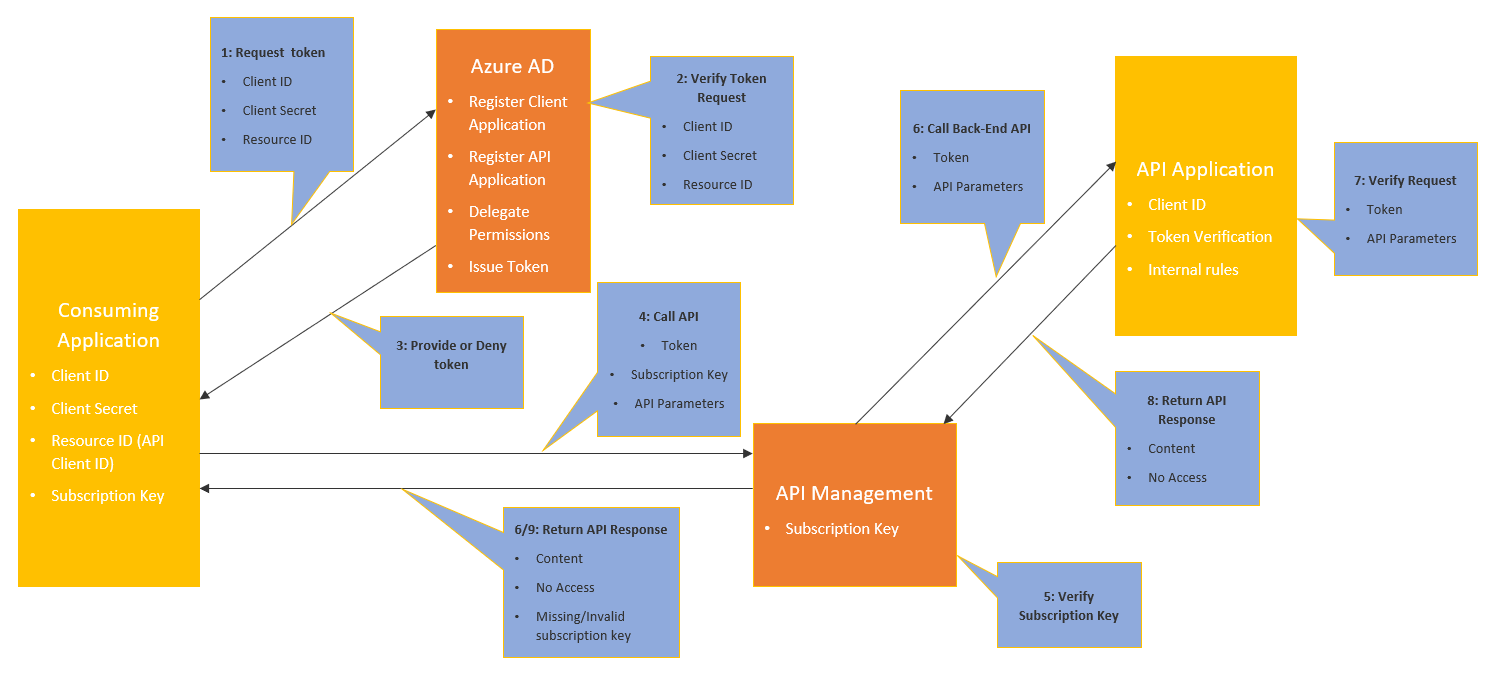
API Management Oauth 2.0 flow using Client Credentials 

1. Client Application need to be registered in Azure AD and send the Client Id, Client Secret, Resource ID (Client Id of the API to be used) and API Subscription Key along with the input parameters for the API.

2. Azure AD will verify the Client Id, Client Secret and Resource ID parameters to check whether this calling application has access for the API.

3. Azure Ad provides a dynamic bearer token for  the client application.

4. API Management will verify whether the subscription key value is a valid one for this client application. In case the back end API is not able to verify the token, then this can be done in Azure APIM Management using Policy.

5. If its valid API Management gateway routes the call to the back end API URL with the dynamic token and API input parameters.

6. API application will verify the dynamic token value , client Id and internal rules any, input parameters for the API and return the API response.


Reference azure Documentation:
https://docs.microsoft.com/en-us/azure/active-directory/develop/v2-oauth2-client-creds-grant-flow